FA New Product: FANUC CNC Design Studio — Seamlessly Connecting Design and the Shop Floor with Digital Twin Technology
FANUC CNC Design Studio is an integrated software platform that centrally manages parameters, programs, and customization data.
By leveraging digital twin technology, it strengthens the link between virtual environments and actual machines, accelerating and streamlining everything from design to debugging
Smooth Data Sharing Through Project Management
FANUC CNC Design Studio allows multiple configuration files and other settings to be managed together as a single project.
By utilizing this project management capability, data sharing with CNC GUIDE 2 is made smoother, further enhancing the coordination between virtual environments and real machines. As prototypes are no longer required, machine development can be speeded up, and the gap between design and shop floor reality can be eliminated.
Benefits
- Centralized management of design data prevents setting errors
- Validated results in the virtual environment can be transferred directly to actual machines
- Reduction in development workload
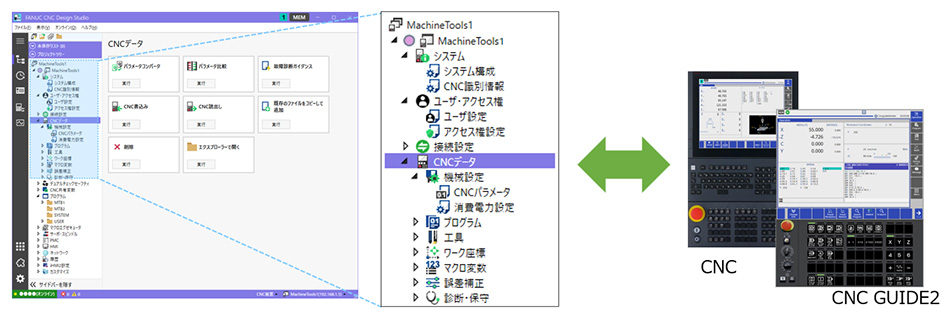
Smoother data sharing through project management
Efficient Tuning Using Digital Twin–Based Online Adjustment
Online adjustment is designed to provide the same operating feel for both CNC GUIDE 2 and the actual CNC. By utilizing digital twin technology, users can streamline the process from pre-verification to shop floor tuning. This allows parameters and signals to be checked without using a prototype, making verification possible in the early stages of development. Additionally, troubleshooting time can be reduced, and shop floor workload can be decreased, significantly shortening the development cycle.
Benefits
- Pre-verification using a digital twin minimizes tuning of actual machines
- Faster troubleshooting
- Shortens development lead time and reduces shop floor workload
Online Adjustment consists of the following three main functions:
Program Management
Users can intuitively perform basic operations such as creating, editing, deleting, copying, and pasting CNC programs. With a list display similar to Explorer, and a ribbon interface, overall usability has greatly improved. Drag-and-drop functionality enables seamless interaction with PCs, and CNC program files can be cross-searched so that required files can be located quickly.
The editing function enables programs of multiple systems to be edited simultaneously by switching between tabs. Editing is reflected instantly.
A difference checking feature displays modifications side-by-side for easy comparison, making correcting work more efficient. These features represent FANUC’s efforts to thoroughly pursue operability and efficiency that are required the shop floor.
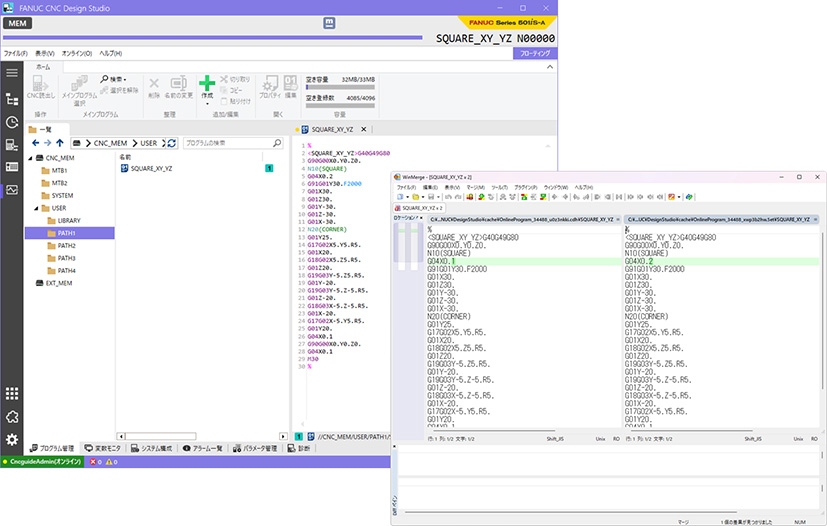
Program Management: Program Editing and Difference Checking
Variable Monitor
Users can collectively monitor CNC common variables, macro variables, and PMC signals, which are essential information for design and tuning. Writing to variables during monitoring is also possible. A bookmark feature allows multiple variables to be saved in a list to be reused later. Furthermore, variable search and autocomplete in variable registration are supported, enabling quick confirmation and registration. This leads to efficient management of frequently used variables, making tuning immensely easier.
By simplifying traditionally complex operations and providing an environment in which necessary information can immediately be accessed, the speed and reliability of development and tuning are enhanced.
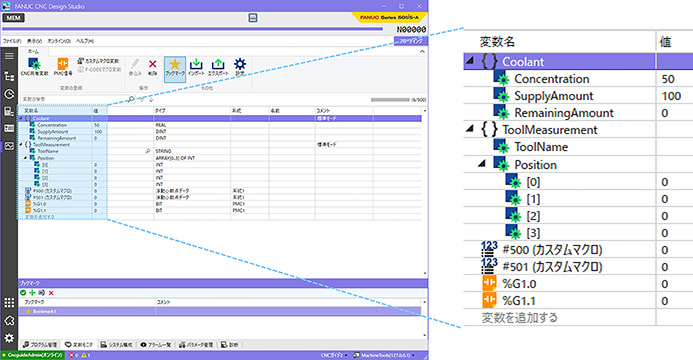
Variable Monitor: Variable Monitoring and Writing
Operation Panel
Machine switches, parameters, and I/O signals are integrated to allow CNC GUIDE 2 to be operated just like an actual CNC. Debugging can be performed without preparing a prototype, enabling efficient verification from the early development stages. Moreover, the screen layout is fully customizable, so that necessary signals and parameters can be handled in groups for smoother tuning.
The use of digital twin has made verification without prototypes and speedy tuning possible.
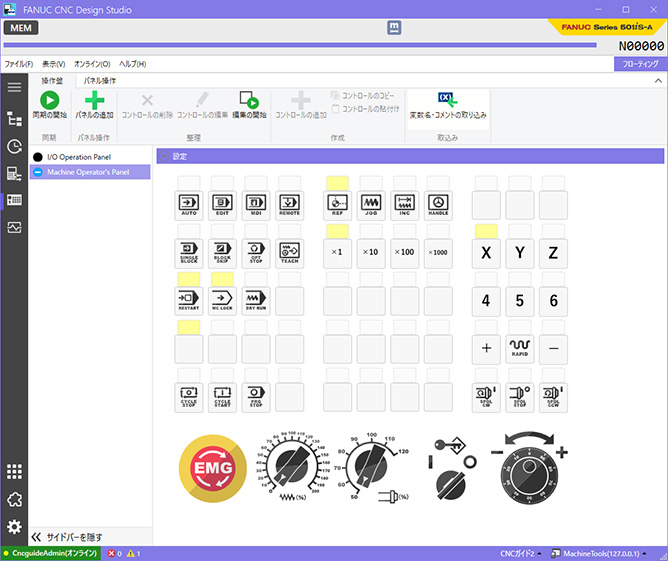
Operation Panel: Integrated Operation of Machine Switches and I/O Signals
Summary
FANUC CNC Design Studio strengthens the coordination between virtual environments and actual machines, dramatically accelerating and streamlining processes from design through debugging.
It simplifies complex data management and proposes a new development style targeting zero trouble. With speed and reliability both enhanced, FANUC CNC Design Studio addresses challenges in actual development environments and helps shape the future of manufacturing.
(December 2025)